XL-F25 Embedded Scan Engine: Parcel Locker Pickup Codes & Smart Locker QR Unlock
Scanning on a locker is nothing like a handheld scanner: there are only a few millimetres of space behind the door panel, users hold a phone screen against the acrylic, the unit runs 24/7, and one cabinet may hold several readers. This guide covers the four locker scenarios, the integration points that decide success, and the XL-F25 engine we recommend for cabinet embedding.
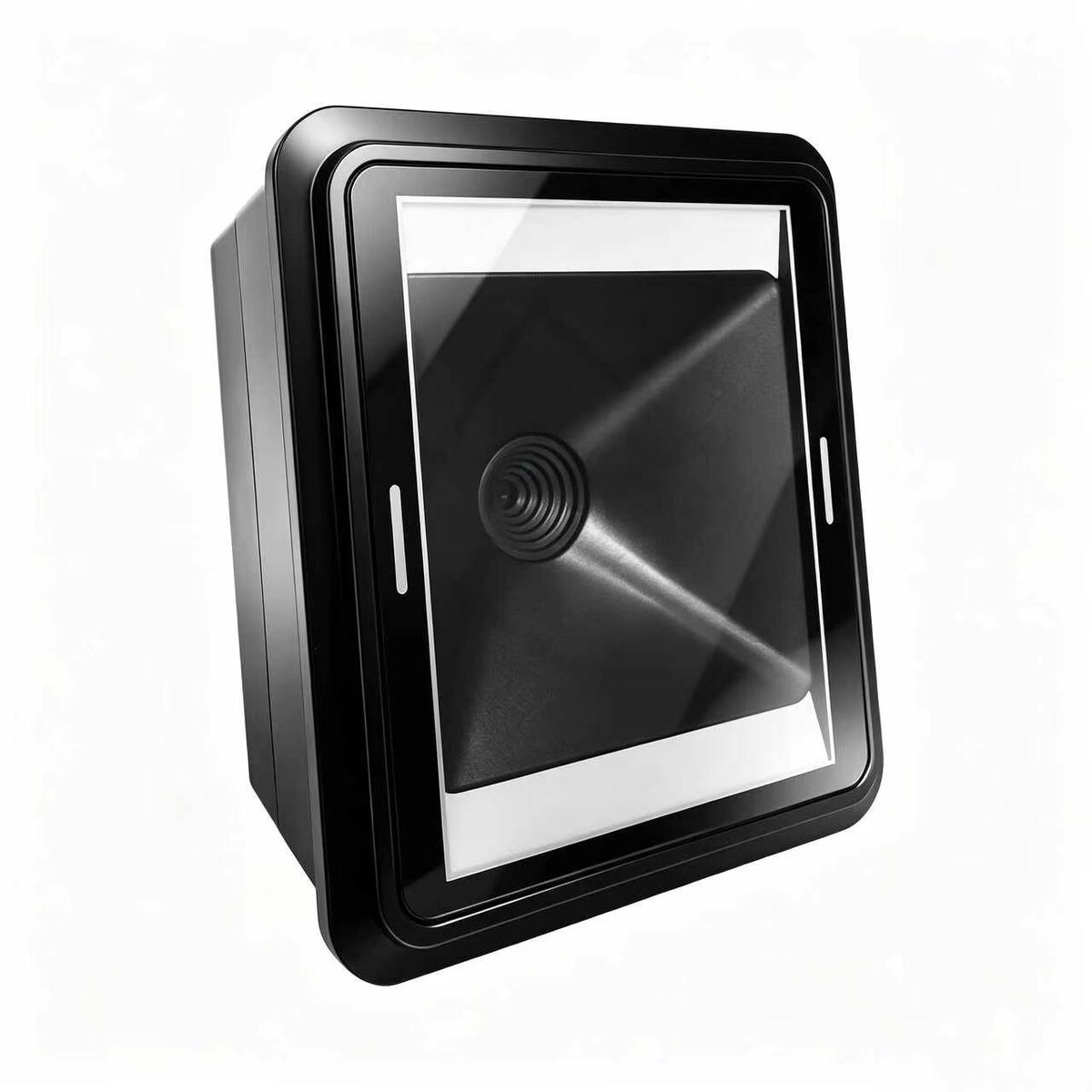
XL-F25 embedded scan engine · 640×480 CMOS, reads both printed codes and phone screens
1. Three ways locker scanning differs
The code source changed. It used to be a printed label on the parcel; increasingly it is a phone screen — a pickup code, a membership code, a mini-program unlock code. Screen codes have uneven brightness, moiré patterns and colour shift behind a screen protector, and are far harder to read than paper.
The space changed. Behind a locker door there is often only 10–20 mm of depth, and the window must dodge the lock and hinges. The engine has to be small, while its field of view still has to cover the area where a user naturally waves the phone.
The duty cycle changed. A locker runs continuously: hot inside in summer, cold outdoors in winter, with fingerprints, moisture and scratches on the panel. The reader must stay stable without "reboot it when it fails to scan".
2. Why the XL-F25 fits inside a cabinet
The XL-F25 is a 640×480 CMOS embedded scan engine that reads both printed codes and phone screens. Because one part handles both code types with the same optics, a single part number can cover an entire cabinet range instead of sourcing separate paper-only and screen-capable readers. In a locker it brings three practical advantages.
Customisable wide-voltage input. A locker usually has a single rail stepped down from 12 V or 24 V. The XL-F25 runs on 4–6 V by default and can be customised for 5–16 V wide input, removing one regulator stage and cutting both wiring and heat.
Customisable RS485. USB and TTL are standard, with RS232 and RS485 available as options. Once a cabinet has many compartments, one 485 bus daisy-chaining the readers is far cleaner than a bundle of USB cables and occupied ports.
Industrial temperature range. −20 °C to +60 °C covers indoor and outdoor cabinets, at 77.8 × 66.4 × 44.7 mm and 70 g — a size that fits behind a locker door.
3. Four typical locker scenarios
Parcel locker pickup codes
The window must handle both the 1D pickup code on a parcel label and the mini-program code on a phone. Labels are creased and taped, so allow enough depth of field — 5–20 cm effective reading distance works well. A common field failure is a window sized around a flat label that clips the corners of a phone screen held at an angle, so test with a real phone rather than a test chart.
Phone-based QR unlock
Users press a phone screen against the acrylic window, scanning through a layer of material — the scenario most likely to disappoint. Material thickness, reflections and fingerprints all hurt read rate. Choose high-clarity acrylic no thicker than 3 mm and leave room for supplementary lighting.
Storage and depot lockers
Both drop-off and collection need confirmation. The reader only outputs the code; the unlock decision belongs to the cabinet controller, which receives the result and status over UART and then drives the lock board. Logging both events also leaves you a defensible record if a parcel is later disputed.
Unmanned retail and fresh-food cabinets
After a QR unlock, weight or vision sensors identify and bill the goods. Here the reader is the identity and entry credential, so fast response and a low mis-read rate matter — you do not want to charge someone else's account.
4. Integration checklist
Two items on this list account for most of the field failures we see: an acrylic panel that is too thick or too dark, and insufficient power headroom once several readers fire at the same moment.
| Item | Recommendation |
|---|---|
| Window size | Slightly smaller than the field of view, with a 1–2 mm light-shielding lip |
| Mounting distance | Phone screens 5–15 cm, printed codes 5–20 cm; verify on the real unit |
| Panel material | High-clarity acrylic, ≤3 mm; avoid frosted or tinted panels |
| Lighting | Add supplementary light indoors; never point it straight into the lens |
| Multi-compartment wiring | Up to 8 readers on a USB hub; more units or runs beyond 3 m, use an RS485 bus |
| Lock control | Reader outputs the code only; the controller decides, over UART |
| Power headroom | Leave margin for several readers working at once to avoid reboots |
5. Choosing a model by cabinet type
| Cabinet / requirement | Model | Why |
|---|---|---|
| Parcel lockers, volume builds, cost-sensitive | F4100 | 800×600 CMOS, only 30 g, USB / TTL232 / RS232 |
| Premium cabinets on a 12 V or 24 V rail | XL-F25 | Customisable 5–16 V wide input and RS485 bus |
| Very thin panel, minimal space | XL-F3-BW / XL-108 | 36×14×11.3 mm (5 g) / 21.6×14.7×14 mm |
6. XL-F25 specifications
| Item | Specification |
|---|---|
| Image sensor | 640×480 CMOS |
| Symbologies | QR Code, Data Matrix, PDF417 and other 2D codes |
| Read precision | 1D ≥6 mil, 2D ≥10 mil |
| Interfaces | USB / TTL; RS232 and RS485 customisable |
| Power | 4–6 V default, 5–16 V wide input customisable |
| Size / weight | 77.8×66.4×44.7 mm / 70 g |
| Operating temperature | −20 °C to +60 °C |
Related Products
Related Articles
Not sure which engine suits your cabinet window?
Send us the cabinet dimensions, window size, code source (printed or phone screen) and power rail — we will spec the model and ship samples.
📞 Contact Xinlong IoT