A USB barcode scanner may type directly into a text field, or it may wait for an application to open a port and receive data. Both use USB, but the host software handles their output differently.
For an OEM device or integration project, start with the receiving application: will it accept keyboard input, or will your software collect and process the scanner data? That decision affects character handling, development work, fault recovery and maintenance.
This guide compares USB HID keyboard mode with USB CDC virtual serial communication. Confirm supported modes, configuration methods and control commands against the documentation for the delivered hardware and firmware.
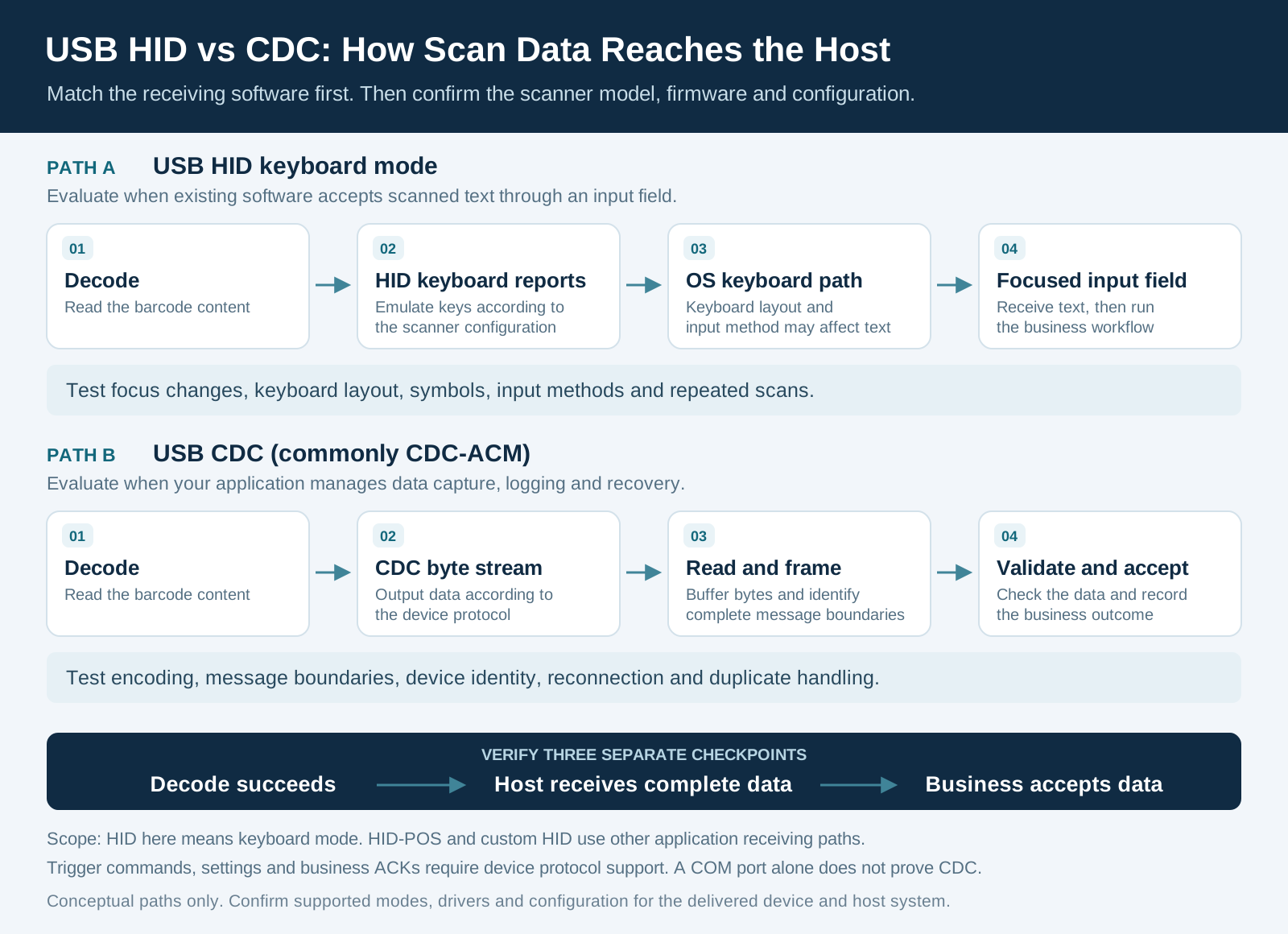
1. USB HID keyboard mode: send scan results through the keyboard input path
HID stands for Human Interface Device. HID Keyboard and HID-KBW describe the keyboard emulation mode commonly used by barcode scanners.
The scanner converts decoded data into keyboard reports. In a conventional text-entry workflow, the operating system routes the resulting input to the control with focus. This makes HID keyboard mode a practical starting point for an existing ERP screen, warehouse application or web form that already accepts typed data.
For a barcode containing 00012345, the target field may receive those characters. A configured Enter suffix may submit the form. However, submission behavior and leading-zero preservation depend on the application and field settings. A spreadsheet can convert the received text into a number and remove the leading zeros.
Test the actual workflow:
- Switch windows or select another field, then check where the scan result goes.
- Match the scanner's keyboard country setting to the host layout and verify punctuation and letter case.
- Check input methods, keyboard shortcuts and consecutive scans.
- Verify any non-ASCII text or GS1 separators required by the project.
Keyboard emulation does not provide transparent transport for arbitrary bytes. Firmware-specific character output features need their own validation.
Custom applications can also use mechanisms such as Windows Raw Input to identify input devices and implement dedicated reception. HID should therefore not be dismissed as inherently unable to distinguish scanners or support background collection; those workflows require software development.
2. USB CDC: let the application receive scan data
CDC is the USB Communications Device Class. CDC-ACM is a common implementation for virtual serial communication. A compatible Windows device can appear as a COM port, which the application opens to read bytes. On Linux, supported CDC-ACM devices commonly appear as /dev/ttyACM*.
This receiving path does not depend on the focused text field. The application can buffer incoming data, retain raw logs, extract complete messages and pass the results to the business system.
A COM port alone does not prove that a device uses CDC. USB-to-serial converters and vendor-specific drivers can also expose virtual ports. Check the manual, USB descriptors and driver information.
Driver requirements depend on the operating system and device implementation. Windows can use its built-in Usbser.sys driver for suitable devices, but this does not make every product labeled “USB COM” universally driver-free. Linux integration also involves permissions and device-node management. Android requires USB Host capability, application permission and a compatible communication implementation.
3. Receive a byte stream, then extract complete barcode messages
A serial-port read or receive callback may contain part of one scan result, several complete results, or a mixture of both. The application must identify message boundaries according to the configured protocol.
The following is a programming example, not a device measurement. Assume that each result ends with CR LF, represented by hexadecimal 0D 0A, and that the payload cannot contain that delimiter. Two results, 00012345 and ABCD, could arrive in three reads:
Read 1: 30 30 30 31
Read 2: 32 33 34 35 0D 0A 41 42
Read 3: 43 44 0D 0A

After buffering and framing:
Result 1: 00012345
Result 2: ABCD
Treating each read as one barcode would truncate or combine records. Buffer the bytes, extract complete messages, and handle timeouts, excessive lengths and residual data after disconnection.
CR LF is only one possible framing convention. QR payloads may contain newlines, while GS1 data may include the ASCII 29 separator (0x1D). Select delimiters, length fields, escaping or another framing method according to the real payload and device protocol.
Character encoding needs an explicit agreement too. CDC does not automatically convert every QR payload into UTF-8. Decode the received bytes using the configured output encoding. Keep hexadecimal logs when investigating corrupted text so that transport and display problems can be examined separately.
4. Choose the receiving method around the application
Scroll horizontally to view all columns. Focus the table to use arrow keys.
| Project requirement | Starting point | What to verify |
|---|---|---|
| Existing software accepts keyboard input | HID keyboard mode | Focus, keyboard layout, characters, prefixes, suffixes and field formatting |
| Custom Windows or Linux software manages acquisition | CDC or a confirmed virtual serial implementation | Drivers, encoding, framing, permissions and recovery |
| Several scanners serve separate stations | CDC, dedicated HID or Raw Input, according to the architecture | Reliable device identification and binding |
| Android or embedded host | Confirm host and application capabilities first | USB Host support, power, permissions and compatibility |
| Software must trigger decoding or change parameters | Check the device control protocol | Supported commands, responses and firmware |
VID/PID can help select a device type. Distinguishing several instances of the same model may also require a serial number, physical port location or a validated binding rule. Do not assume that every device exposes a unique serial number or that a COM number remains a permanent identifier.
Performance must be tested with the target scanner, firmware and application. HID output pacing and host processing can affect results; the interface name alone does not establish which mode is faster. Likewise, a virtual port's configured baud rate is not the USB bus speed. Whether that setting affects internal device behavior depends on the firmware.
5. Verify decoding, reception and business acceptance separately
A successful decode is one stage of the workflow. Record three outcomes:
- Decode success: the scanner obtains the payload and outputs it according to its configuration.
- Complete host reception: the receiver obtains the expected content with the correct length, encoding and boundaries.
- Business acceptance: the application completes its format, work-order or authorization checks and records the outcome.
Consult the manual for the meaning of each beep and indicator. A scanner's success signal does not establish that a manufacturing execution system (MES) stored the record or that an access-control application approved entry.
Host-trigger commands, parameter changes and business acknowledgments require support in the device protocol. CDC itself does not define those business functions.
Repeated data also needs application context. The same code may appear because of another scan, continuous reading or duplicate software processing. Design deduplication, retries and reconnect behavior around the workflow so that valid repeat scans are preserved.
6. Validate the delivered Xinlong scanner configuration
Xinlong's F42-NFC development documentation distinguishes HID-KBW, USB CDC and HID-POS. The F31/F41/F53 industrial-series settings manual also describes HID keyboard, CDC virtual serial and HID-POS modes separately.
Use these distinctions when evaluating the F42-NFC barcode and NFC module or discussing an F31-BW integration. Confirm the exact model, hardware revision, firmware, selected mode and applicable manual for the supplied sample. Support for several modes does not establish simultaneous output or identical defaults across firmware versions.
HID-POS uses HID reports and the relevant application protocol. Evaluate its receiving software separately from the keyboard workflow.
For sample acceptance, prepare real barcodes and expected outputs covering:
- Leading zeros, mixed case, punctuation, long payloads, and any required non-ASCII or GS1 data.
- Consecutive scans, repeated codes and two connected scanners.
- Window changes, input methods and field formatting for the keyboard path.
- Unplugging, occupied ports, application restarts and system sleep/resume for the port path.
Record the device mode, operating system, raw received data and business outcome. If a record is missing, these logs help locate the failure between scanner output, host reception and application processing.
For an OEM barcode scan engine project, share the host system, receiving software, representative barcode samples and required control functions. Discuss the interface configuration with Xinlong IoT before defining the sample acceptance procedure.
Technical references
- Xinlong F31/F41/F53 industrial-series settings manual, USB communication sections; F42-NFC development documentation. Confirm applicability to the delivered product and firmware.
- Microsoft: USB serial driver (Usbser.sys)
- Microsoft: About Raw Input
- Android Developers: USB host overview
- Linux Kernel: USB ACM driver