A visitor presents a QR pass on a phone. A member of staff presents a contactless card. Both credentials need to reach the same access-control system with data that the controller can interpret.
The F21-NFC-W QR and NFC reader module combines barcode imaging and 13.56 MHz contactless card reading. Its current product listing specifies Wiegand 26/34, RS-232 and USB interfaces. Before ordering a sample, agree the required interface, credential data format and mounting arrangement for your turnstile or access panel.
This guide follows that integration process: establish the reader's role, check the installation, define the data contract and test the assembled equipment.
1. Separate credential reading from the access decision
The reader captures barcode content or supported card data. The host or access controller interprets that output and decides whether to grant entry. A successful decode does not establish that a ticket is genuine, unexpired or permitted at that entrance.
For visitor QR passes, define where signature or token validation, expiry checks and replay handling take place. For cards, agree which identifier or application data the system expects. Reading a card UID alone does not establish possession of a securely authenticated credential.
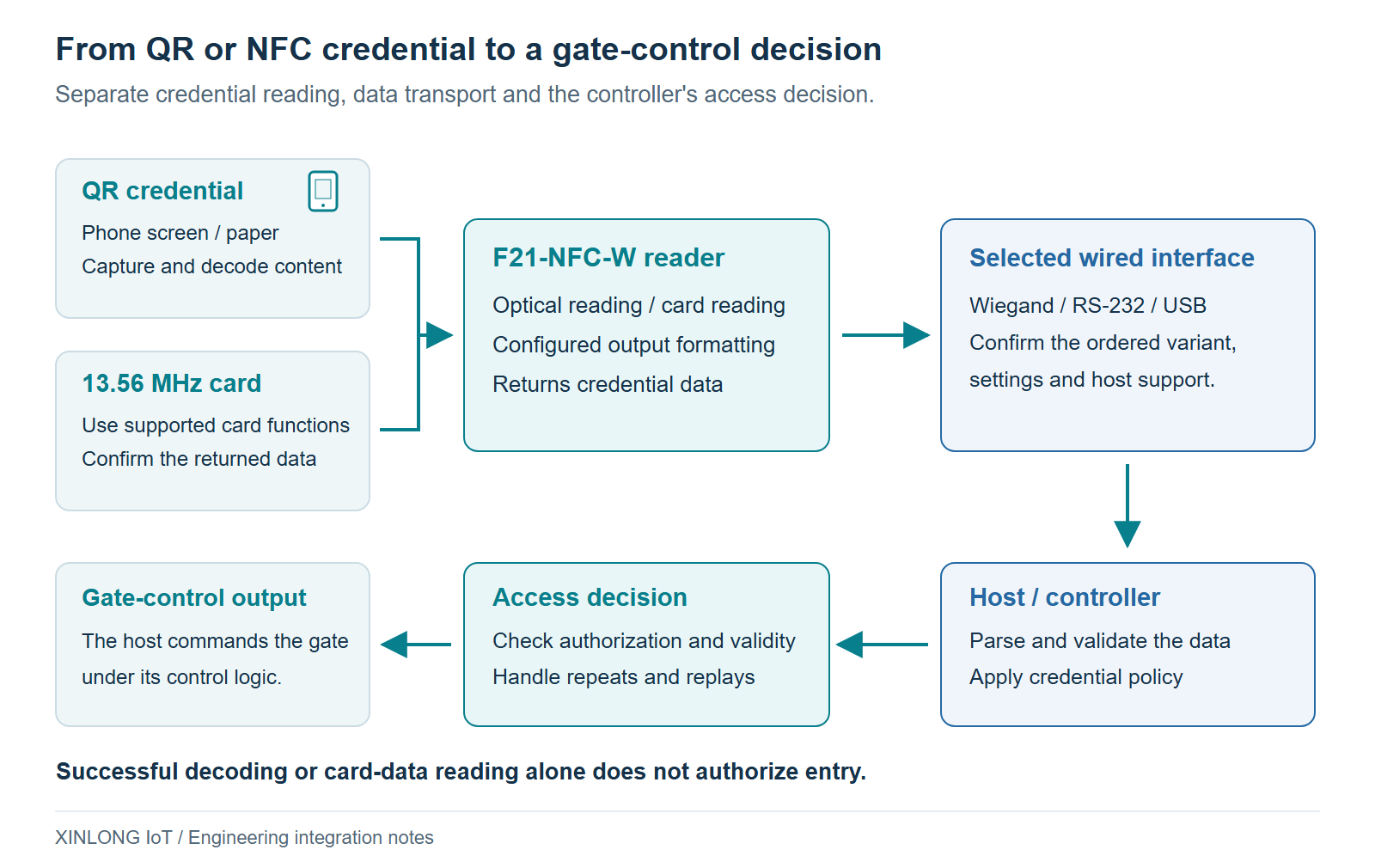
An access panel may already accept a short numeric identifier over Wiegand. A kiosk application may instead need the full QR string for local or server-side validation. Settle that requirement before choosing the output configuration. The available interface list does not establish that every interface operates simultaneously on the supplied unit.
2. Confirm the mounting drawing before designing the panel
The current F21-NFC-W webpage describes an 18.5 mm slim profile. For production design, request the approved drawing for the exact housing and cable assembly being supplied. Confirm the full envelope, front opening, fixing positions, connector access and cable exit direction.
Allow cable space according to the supplied harness and its permitted bend radius. A single allowance cannot cover every cable, connector or bracket layout. Check that servicing the reader will not require pulling or sharply folding the cable.
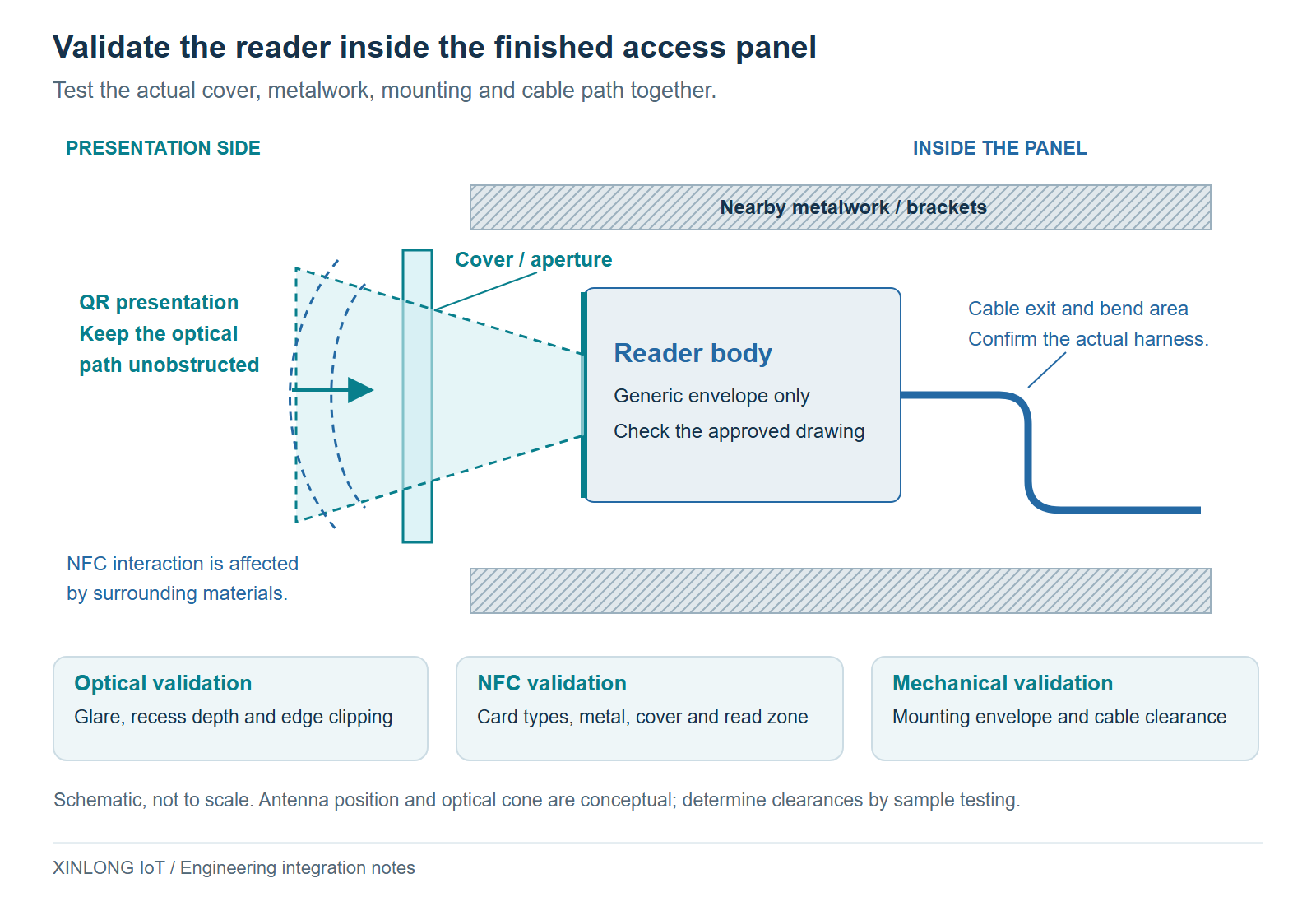
For QR reading, evaluate cover thickness, surface reflections, recess depth and aperture clipping with the reader installed. A code that reads on an open bench may become difficult to capture behind the finished panel.
For NFC, nearby conductive parts can change antenna behaviour. Include the intended bezel, brackets, fasteners and cover material in the card test. Establish clearance from the approved antenna guidance and sample results.
Keep the revision-matched mechanical drawing and harness specification with the production build record. Use those documents to approve the panel cutout and mounting, then repeat the credential tests in the finished housing.
3. Define Wiegand mapping or a full-text output format
Wiegand 26/34 support is useful when the host expects a configured credential number. It does not specify how an arbitrary QR string or card UID will be converted into that number.
Scroll horizontally to view all columns. Focus the table to use arrow keys.
| Host requirement | Output to evaluate | Items to agree before connection |
|---|---|---|
| An existing door controller accepts a fixed-format credential | Wiegand 26/34 configuration | Bit layout, data mapping, parity, electrical characteristics and controller settings |
| The application needs a QR payload containing letters or multiple fields | A supported RS-232 or USB text-output mode | Maximum length, encoding, framing, prefixes/suffixes and error handling |
| A PC application needs background data reception | The USB or serial mode supported by the ordered unit | Driver and OS support, interface enumeration and receive behaviour |
Wiegand: agree the identifier mapping
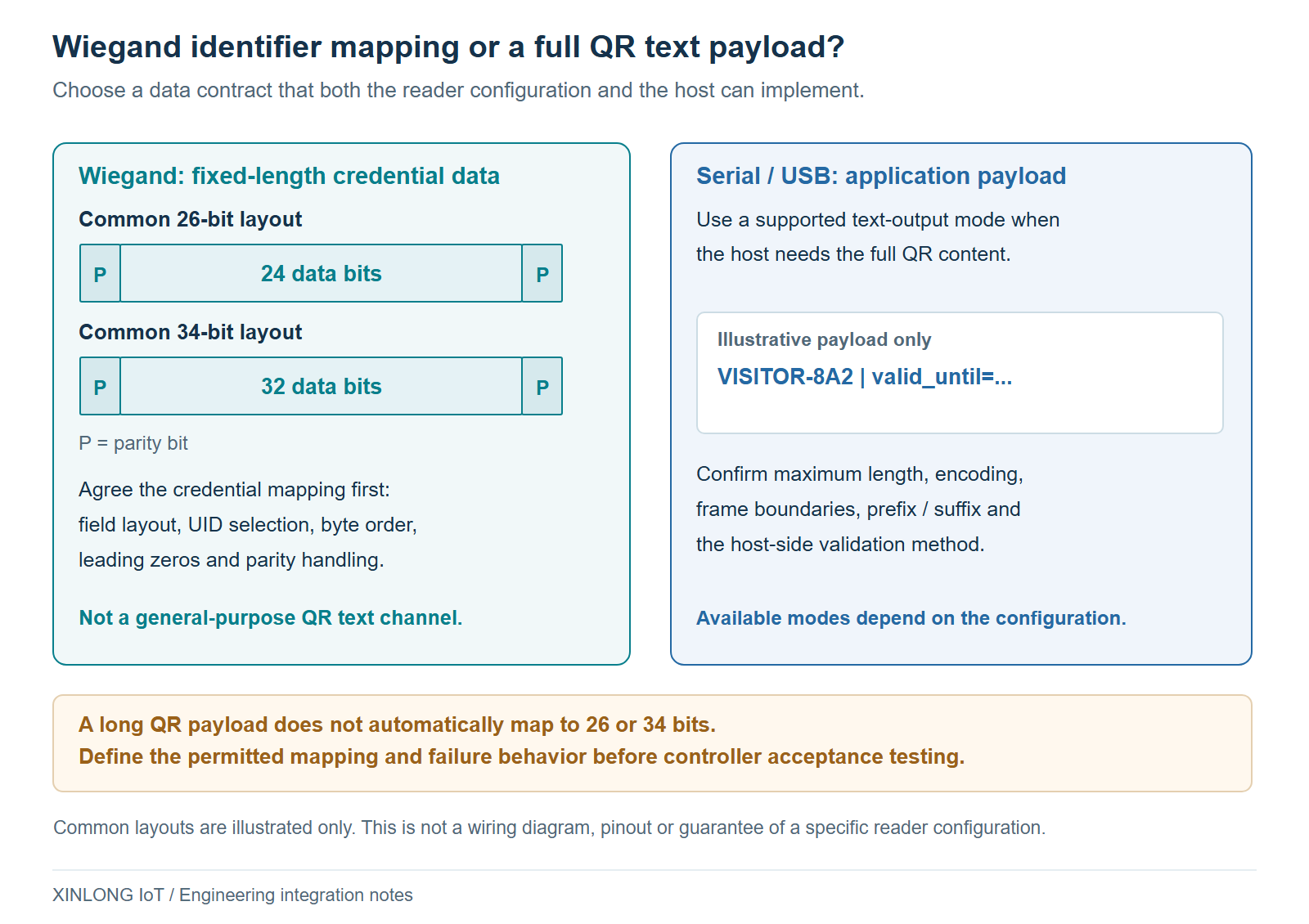
Common 26-bit formats use 24 data bits with two parity bits; common 34-bit formats use 32 data bits with two parity bits. Controller formats vary. These examples describe typical layouts, not a complete F21-NFC-W configuration specification.
For the selected reader and controller, agree the input format, any facility or site field, UID byte selection, byte order, leading-zero handling and overflow behaviour. Check the required pulse timing, signal levels, pull-ups and wiring against the approved interface documents. This article is not a pinout.
Do not silently shorten a longer identifier to fit the controller. Different credentials can produce the same shortened value. If mapping is required, document it with test vectors and verify that the supported reader configuration or integration software implements the agreed rule.
RS-232 and USB: verify the ordered mode
When the host needs the complete QR content, evaluate a configuration that outputs that content intact. Confirm serial electrical levels before connecting; RS-232 and TTL UART require different interfaces. Fix the baud rate, character format and message boundary in the integration specification.
For USB, confirm the modes available on the supplied firmware. Keyboard emulation and virtual serial operation have different host requirements. The general word “USB” on a product page does not establish that both modes are included. Test focus behaviour if using keyboard input, and driver and reconnection behaviour if using a virtual port.
For more on shared barcode and card data, see Barcode and NFC Interfaces, Data Formats and UID Byte Order.
4. Use published optical figures as a sample-test baseline
The following values appear in the reviewed F21-NFC-W English brochure. They describe the reader under its stated specification conditions; they do not replace a test with your credential, installation and ordered configuration.
Scroll horizontally to view all columns. Focus the table to use arrow keys.
| Item | Published value | Integration check |
|---|---|---|
| Image sensor | 640 × 480 CMOS | Test the smallest intended QR code and its actual content |
| Resolution | ≥ 7 mil, using the brochure's wording | Confirm the relevant symbology and sample conditions; do not treat this as a QR symbol side length |
| Barcode depth of field | 0–100 mm | Establish the usable presentation zone behind the finished cover; this is not an NFC read-distance specification |
| Print contrast signal | ≥ 30% | Test representative labels, ticket stocks and screen conditions |
| Ambient light | 0–100,000 lux | Evaluate glare and illumination direction in the installed location |
| Input supply | 5 V | Verify permitted tolerances, wiring and supply behaviour for the ordered unit |
The product webpage identifies 13.56 MHz contactless card reading. Specify the exact card family and the data or transaction required when requesting a sample. Protocol compatibility alone does not establish support for protected memory access, a particular authentication method or every mobile-wallet credential.
Keep optical and card tests separate. Barcode working distance, optical field of view and NFC presentation distance describe different aspects of the system.
5. Validate the assembled turnstile with a repeatable test matrix
Use the same credential set on the open bench and in the finished panel. Record the housing revision, firmware, interface configuration, cover material, supply and host software version so the results can be repeated.
Scroll horizontally to view all columns. Focus the table to use arrow keys.
| Test group | Include | Record |
|---|---|---|
| QR presentation | Representative phones, chosen brightness settings, screen protectors, printed passes, angles and distances | Correct output, missed reads, retries and response time |
| Card presentation | Every intended card family and orientation, with the actual panel and surrounding metal | Returned identifier/data, read zone and consistency |
| Data compatibility | Valid payloads, leading zeros, boundary lengths, unsupported input and repeated presentation | Raw reader output and the controller's interpreted value |
| Application decisions | Valid, expired, revoked and replayed passes as supported by the system | Acceptance or rejection and resulting gate command |
| Recovery and power | Host restart, reader reconnection and representative power conditions | Re-enumeration, parser recovery and unintended output |
Define the pass criteria before testing. A useful report includes correct first output, timeouts, incorrect output and duplicate delivery. State the measurement boundary for response time; a timestamp at the host includes transport and software delays as well as reader activity.
Holding the same QR code in front of the window can produce repeated reads under some configurations. Check reader repeat settings and controller logic together. A repeat-suppression interval at the reader does not by itself provide application-level ticket replay protection or guarantee one gate opening per valid pass.
Use the QR module sample-validation guide to organise the wider integration trial.
6. Compare adjacent models by installation requirements
Use the embedded module range and access-control reader range to compare the alternatives against your drawing and controller requirements.
Scroll horizontally to view all columns. Focus the table to use arrow keys.
| Candidate | Reason to include it in the evaluation | Confirm for the supplied version |
|---|---|---|
| F21-NFC-W | Combined QR/NFC reading for an embedded access panel; the current listing includes Wiegand | Approved mechanical drawing, interface configuration and credential mapping |
| F21-NFC | An alternative barcode-plus-NFC module | Housing, mounting, interface and environmental requirements |
| F42-NFC | Another barcode-plus-card module for terminal integration | Required barcode detail, card support and available outputs |
| XL-D52-E | A wall-panel reader to compare with an embedded module | Wall-box fit, network/interface variant and installed sealing |
An embedded reader's own protection statement does not automatically establish the rating of a completed turnstile. Assess the supplied component and the final enclosure separately.
Request an F21-NFC-W sample for your controller
Send your panel drawing, cover material, host interface and representative QR/card samples. Include the expected output for each credential and the controller format you need to match. This gives the sample evaluation a concrete acceptance target.
Discuss an F21-NFC-W sample. Select F21-NFC-W in the enquiry form or include the model in your requirements.
View the F21-NFC-W product · Download the English brochure